Solve data quality issues in a scalable way with Agentic AI
Traditional if/then conditions worked and had limits
Every Adobe Marketo Engage instance I’ve worked with has a common challenge: messy data managed by brittle rules.
Take the Country field. Right now, in your database, you probably have “US”, “USA”, “United States”, “united states of america”, “U.S.A”, and a dozen more variations – all meaning the same thing.
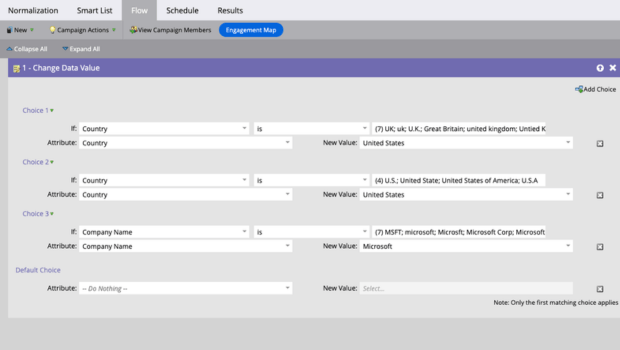
The traditional fix? A data management program with dozens of if/then conditions. One for every variation you can think of. Then a new variation shows up next week, and you’re back in the smart campaign. To complicate this further someone adds a different attribute to choices and the design becomes compromised – only the first matching choice applies.
This doesn’t scale. It never did. The problem silently bocks your pipeline. Leads which could MQL never went ahead in lead flow. The LLM capability did not exist. Solving this problem and making it automatic was not feasible until we could configure an AI layer around Marketo.
What changes with an AI Layer?
I built an integration that lets Marketo send field data to an LLM and receive normalized, clean values back – in real time, inside the lead processing flow.
- No manual cleanup.
- No growing list of smart list rules.
Why this matters beyond the Country field?
Country is the easy example. Initially, it was my sincere attempt to understand the skeleton to integrate AI and Marketo. The real value however, shows up when you apply this to more fields and objects.
- Company names – “MSFT”, “microsoft”, “Microsoft Corp”, “Microsoft Corporation” all collapse to one standard value. You don’t need to update it. LLMs keep learning from trainings and your workflow stamps the widely accepted name of the Company.
- Job titles – normalize seniority levels, score directly using a reasoning model
- Free-text form fields – categorize, extract intent, flag garbage data before it enters your workflows
Each of these is a problem where writing deterministic rules are an endless maintenance burden. An LLM handles the ambiguity natively.
While the examples I share originate from a thinking to do things a certain way, if you think from first principles, AI can be applied to absolutely new problems to create truly innovative solutions. Not only this enables you to automate and scale the solutions for the problems you were already solving in a less-scalable traditional manner. This AI-native design enables you to solve absolutely new problems and automate absolutely new solutions. This thinking has a significant positive effect on revenue.
What this isn’t?
This is not “slap ChatGPT to Marketo”
The integration requires careful orchestration – for example – webhook design, payload structure, error handling, model selection, token economics, trust and compliance.
Orchestrating Agentic AI systems needs judgement. For example:
- Where exactly in Adobe Marketo Engage do we need to call this webhook?
- Does the AI-usage policy approve this flow? Do we even have a policy?
- Should we do this for every lead independently, or should we use a list and batch process the workflow every day/week?
- How much costly it becomes with more lead volume and better models?
These practical realities ensure that we’re not doing a fancy pilot – we’re building it for real adoption with intention.
Here’s the overview of this Agentic AI integration with Adobe Marketo Engage – We move context from Marketo to LLM. We enable an Agentic AI integration to let Adobe Marketo Engage ask the LLM to use the context it gave it and create some value (clean some data in this case). The LLM replies with something valuable, in this case, clean data. In a sense, configuring AI Agents is ‘value engineering’.

More possibilities
Data normalization is just the first use case. I’m building additional AI integrations for Marketo – lead enrichment, intelligent routing, and content personalization layers that sit on top of existing Marketo programs without replacing them.
The pattern is the same: let Marketo do what it’s good at (deterministic workflows), and let AI agents handle what they’re good at (ambiguity, language, knowledge).
I’ve spent 12 years inside Marketo – optimizing enterprise instances, building delivery teams, and now adding AI layers that solve problems Marketo wasn’t designed to handle alone.
If this is a problem you’re dealing with in your Marketo instance, feel free to connect with me on LinkedIn.
 Balkar Singh Rao